
Customer Support Team Monitoring
Track support hours, attendance, tools used, and productive time.
Understand support coverage and productivity
WHM helps support managers review logged hours, idle time, app usage, website usage, screenshots, attendance, and reports so customer-facing teams stay accountable across shifts.
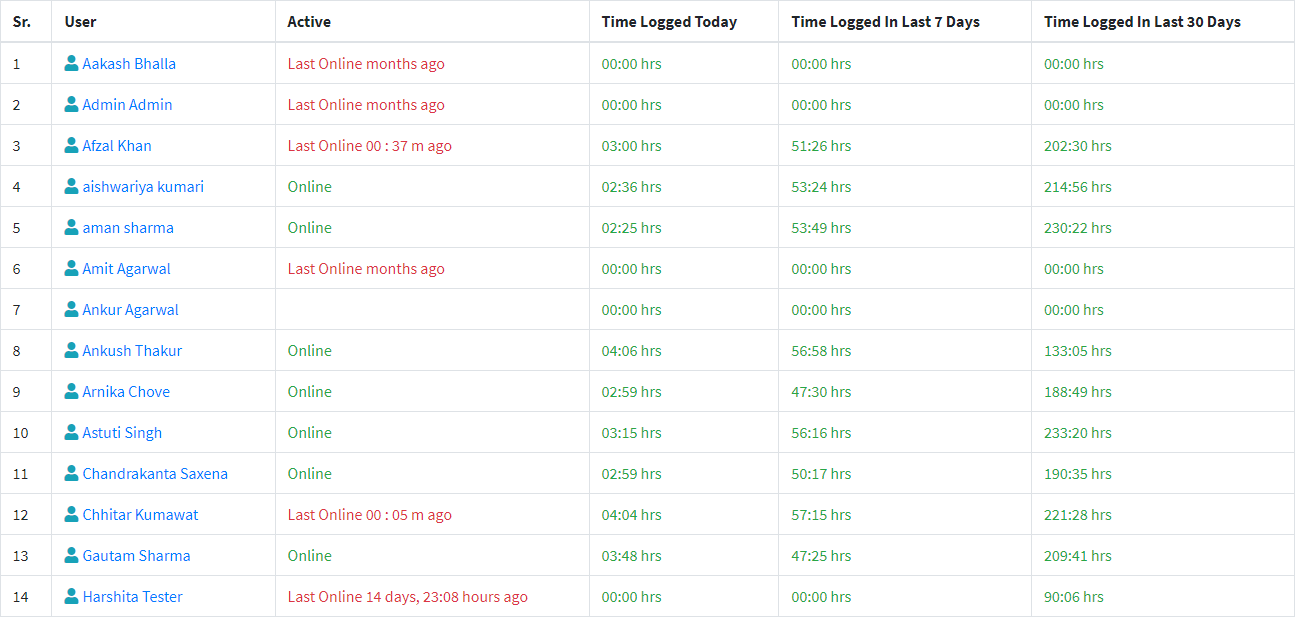
Shift Visibility
Review attendance, worked today, idle time, and live team status.
Tool Usage
See helpdesk, chat, browser, and internal app usage during work hours.
Manager Reports
Use daily and monthly reports for coaching and staffing reviews.
Operational visibility for shift-based support teams
Customer support managers need to know whether shifts were covered, support tools were active, and response work happened during scheduled hours. WHM connects attendance, active time, apps, websites, screenshots, and reports into a practical review workflow.
What support leads can review
- Online, offline, idle, and worked-today team status.
- Helpdesk, chat, browser, CRM, and internal app usage.
- Daily attendance and shift work-hour consistency.
- Screenshot timelines for coaching and work verification.
Where WHM helps support teams
- Improve coverage visibility for rotating shifts.
- Find gaps between scheduled hours and tracked work.
- Review non-productive websites during support hours.
- Use reports for staffing, coaching, and payroll checks.
Customer Support Monitoring FAQs
Can WHM show support team coverage?
Yes. WHM shows attendance, worked-today status, idle time, and work-hour reports that help managers review support coverage.
Can WHM track support tools and websites?
Yes. WHM tracks app usage, website usage, and page-title context during work hours.